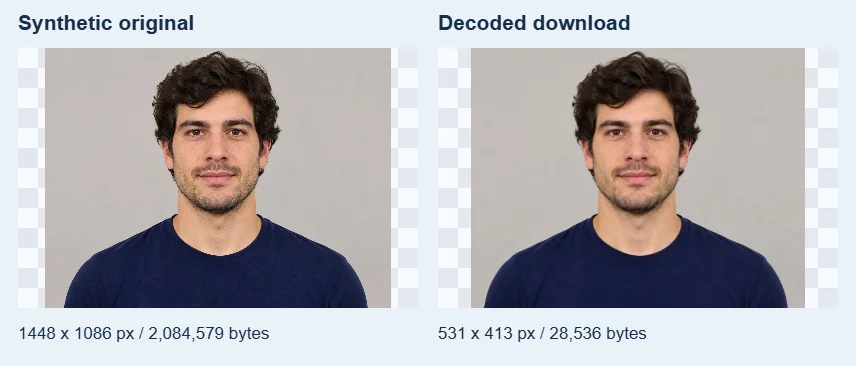
4.5 cm x 3.5 cm Photo – Crop and Resize for Landscape
Resize a photo to 4.5 cm wide × 3.5 cm tall — the landscape 4.5 × 3.5 cm size — in seconds.
Drop a photo here, paste it, or choose a file
JPG, PNG, WebP, GIF and BMP, under 25 MB. Use a photo taken against a plain background, facing the camera. Your photo never leaves this browser — nothing is uploaded.
Position the photo
Drag the photo inside the frame to centre the face, and use the zoom slider to fit it. The frame shows exactly what the download will contain. There is no automatic face detection — you position the photo yourself.
Crop the photo to the exact ratio with the draggable frame, check the pixel size at your DPI, and download. At 300 DPI the photo is 531 × 413 px. Everything runs in your browser; nothing is uploaded.
How to Resize Image to 4.5 x 3.5 cm With Correct Dimensions
Resizing to 4.5 × 3.5 cm takes four quick steps: add a photo, keep the 4.5 × 3.5 cm preset (it is selected by default on this page), centre the photo in the frame, and download. Note the orientation: 4.5 cm wide and 3.5 cm tall is landscape — wider than it is tall — which is different from the portrait 3.5 × 4.5 cm size.
Prepare Input Files or Images
Add a JPG, PNG, WebP, GIF or BMP file under 25 MB using the file picker, drag-and-drop, or paste. Start from the largest, clearest version of the photo you have, taken against a plain background — this tool crops and resizes, but it does not remove or replace backgrounds. Before you start, confirm the form asks for 4.5 cm wide × 3.5 cm tall (landscape), and note its DPI and any file-size limit.
Choose Settings and Preview Changes
The tool opens with the 4.5 × 3.5 cm preset at 300 DPI, giving 531 × 413 px. Drag the photo inside the frame to centre the subject and use the zoom slider to fit it — the frame keeps the 4.5 : 3.5 ratio, so nothing is stretched. If your form states a different DPI, change it and the pixel size updates: at 200 DPI the same size is 354 × 276 px, and at 150 DPI it is 266 × 207 px.
Download and Verify the Output
Click "Download passport photo" and check the downloaded file: its dimensions should match the "Output size" shown on the page — 531 × 413 px at 300 DPI — and the DPI value is written into PNG and JPEG downloads when the checkbox is ticked. If the form also limits the file size in KB, tick "Target a file size in KB" and set the target before downloading.
Resize Image to 4.5 x 3.5 cm: Width, Height and Aspect Ratio Settings
The 4.5 × 3.5 cm size is a ratio of 9:7 — the width is about 1.29 times the height. The crop frame enforces that ratio: whatever you drag into it comes out at exactly 4.5 × 3.5 cm at the chosen DPI, with no stretching. If the photo is portrait-shaped, the frame crops the top and bottom; if it is very wide, it crops the sides. The zoom slider scales the photo under the frame without changing the ratio.
Recommended Default Settings
Keep the 4.5 × 3.5 cm preset at 300 DPI (531 × 413 px) unless the form states another DPI. Use JPG format for the smallest file, keep "Write DPI into the downloaded file" ticked, and centre the face with a little space above the head. Only add the name and date-of-birth strip when the form asks for it — it makes the download taller than 4.5 × 3.5 cm.
4.5 Cm X 3.5 Cm Photo Size Online Free: Examples and When to Use It
The landscape 4.5 × 3.5 cm photo size appears on forms and ID documents that expect a wider-than-tall photo — the opposite orientation to the portrait 3.5 × 4.5 cm size, so the two are not interchangeable. A common mistake is entering the numbers the wrong way round: 4.5 cm is the width, 3.5 cm is the height. This page opens with that orientation already set, so the frame is wider than it is tall.
Real Input and Output Example
Take a 600 × 900 px portrait photo. With the 4.5 × 3.5 cm preset at 300 DPI the landscape frame crops it to 531 × 413 px — the width comes from the photo's width, the height from the middle band of the photo, and the top and bottom are cropped away. The same photo with the 3.5 × 4.5 cm preset (portrait) would download at 413 × 531 px instead. The "Output size" readout always shows the exact result before you download.
Pixels, Measurement Units, DPI and Output Quality
Centimetres describe a printed size; pixels are what the file holds, and DPI is the bridge between them: px = cm × DPI ÷ 2.54. At 300 DPI, 4.5 cm is 531 px and 3.5 cm is 413 px. At 200 DPI the same size is 354 × 276 px, and at 96 DPI it is only 170 × 132 px — the same centimetres, very different files. The conversion note under the size controls always shows the pixel size at the DPI you have chosen, so there is no guessing.
Image Quality, Size and Compatibility Checks
Shrinking a photo keeps it sharp; enlarging a small photo to 531 × 413 px softens it, because the browser can only interpolate between the pixels that exist. Transparent PNGs stay transparent in PNG and WebP downloads, but JPG has no transparency, so a transparent photo exported as JPG is flattened onto the background colour. Files over 25 MB are rejected, and the output is capped at 8,192 pixels on a side.
Common Resize Image to 4.5 x 3.5 cm Problems and Fixes
The most common problem is the wrong orientation: a 413 × 531 px download means the portrait preset was active, not the landscape one — pick the 4.5 × 3.5 cm preset and check the frame is wider than it is tall. A blurry result usually means a small photo was enlarged; start from a larger original. If the download is taller than expected, the name and date-of-birth strip is on — untick it for a photo-only download.
Troubleshooting Upload, Preview or Export Issues
A file that refuses to load is usually an unsupported type or a damaged file — the tool names the file in its error message. If the frame shows a grey box instead of the photo, the image is still loading or failed to decode; try the file again. If the download does not start, allow downloads from this site in your browser and try again.
Related Tools and Next Steps
Merge Images, Passport Photo Maker, Resize Image in Cm, Image Resizer, Reduce Image Size in KB.
Frequently Asked Questions About Resize Image to 4.5 x 3.5 cm
Mobile Support, File Privacy and Download Options
This page works in any modern mobile or desktop browser. Your images are processed locally with the Canvas API and never leave your device, and downloads save straight to your phone or computer.
What is 4.5 cm x 3.5 cm in pixels?
It depends on the DPI: at 300 DPI, 4.5 × 3.5 cm is 531 × 413 px (px = cm × DPI ÷ 2.54). At 200 DPI it is 354 × 276 px, and at 150 DPI it is 266 × 207 px. The conversion note on the page shows the pixel size at the DPI you have chosen.
Is 4.5 x 3.5 cm landscape or portrait?
Landscape: 4.5 cm is the width and 3.5 cm is the height, so the photo is wider than it is tall. The portrait version is 3.5 × 4.5 cm (413 × 531 px at 300 DPI) — a different size, available as a preset on the passport photo maker page.
How do I resize a photo to 4.5 x 3.5 cm?
Add the photo — the tool opens with the 4.5 × 3.5 cm preset at 300 DPI already selected. Drag the photo inside the frame to centre the subject, use the zoom slider to fit it, then download. The result is 531 × 413 px at 300 DPI.
Does the DPI setting change the pixel size?
Yes, for cm, mm and inch sizes: the same 4.5 × 3.5 cm gives more pixels at a higher DPI. That is why the page shows the conversion at the DPI you have chosen. DPI is also written into PNG and JPEG downloads when the checkbox is ticked.
Are my images uploaded to a server?
No. Resizing happens entirely in your browser using the Canvas API. Your images are never sent to a server, never stored, and disappear when you close or refresh the page.
Check whether the dimensions are width by height
The 4.5 cm x 3.5 cm preset has an orientation. Confirm the order of the dimensions in the form before setting the crop. At 300 pixels per inch the approximate width and height are 531 by 413 pixels when the stated order is width first.
Adobe explains how physical dimensions translate to pixels.

Check the width first for a 4.5 cm x 3.5 cm landscape photo
A width of 4.5 cm and height of 3.5 cm makes a landscape photo. At 300 DPI that is 531 by 413 pixels after rounding. Position the source within the fixed frame before saving, especially where the crop could cut the subject.